Meta Ads pre-launch checklist: 9 checks before you spend ₹1
Most Meta Ads budgets don't fail after launch. They start leaking before the first lead comes in: a pixel that doesn't fire, a page that loads slowly, a follow-up that never happens. This is the checklist I run before every campaign goes live.
Quick answer: Before launching Meta Ads, check that (1) Pixel and Conversions API are firing, (2) the campaign optimises for leads, not clicks, (3) the landing page loads in under 3 seconds on mobile, (4) the offer is clear in one line, (5) the form is short, (6) you have 3 different creative angles, (7) the budget can reach about 50 results per ad set per week, (8) every lead gets a call within 5 minutes, and (9) UTMs let you track lead to sale.
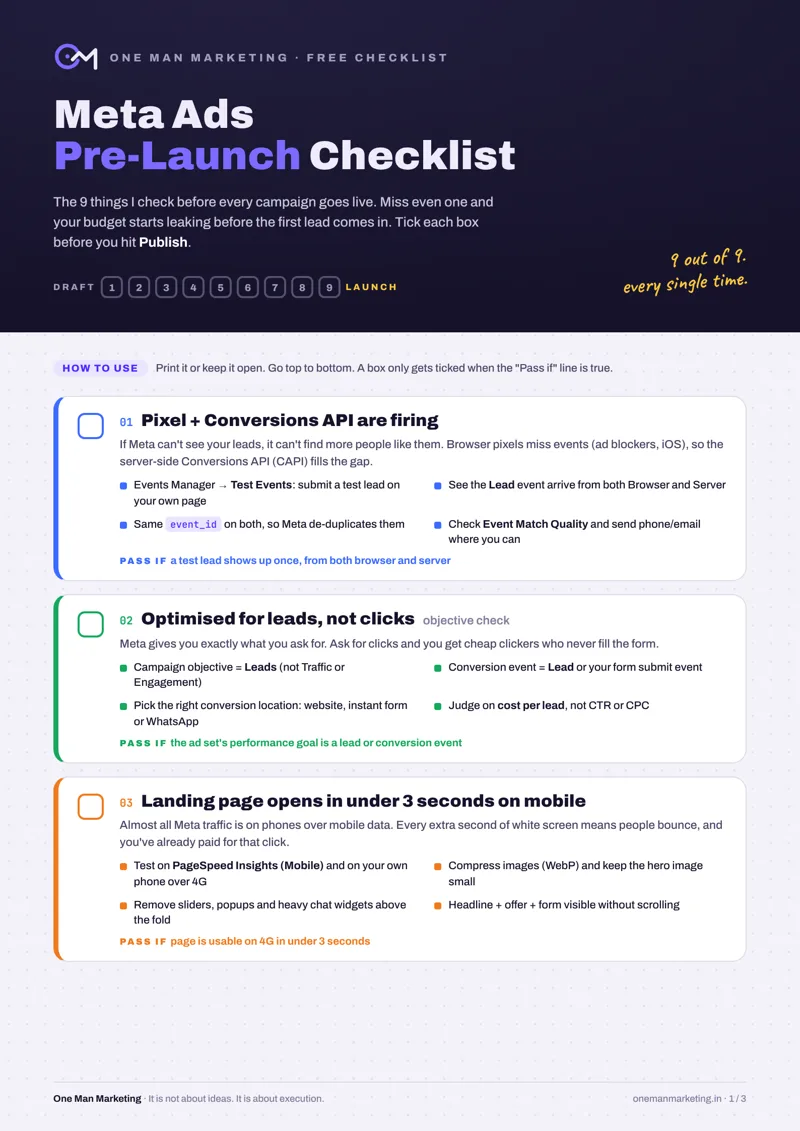
Download the free checklist (PDF)
3 printable pages with tick boxes, a "pass if" test for every check, the budget formula and a score guide. No email needed.
Download PDF ↓ PDF · 3 pages · about 200 KBHow to use it: go top to bottom. A box only gets ticked when its "pass if" line is true. Nine out of nine, every time.
1. Are the Meta Pixel and Conversions API firing?
If Meta can't see your leads, it can't find more people like them. Browser pixels miss events because of ad blockers and iOS privacy settings, so the server-side Conversions API (CAPI) fills the gap.
- In Events Manager, open Test Events and submit a test lead on your own page.
- Check that the Lead event arrives from both Browser and Server.
- Use the same
event_idon both, so Meta counts the lead once. - Check Event Match Quality and send phone or email where you can.
Pass if: a test lead shows up once, from both browser and server.
2. Is the campaign optimised for leads, not clicks?
Meta gives you exactly what you ask for. Ask for clicks and you get cheap clickers who never fill the form.
- Campaign objective is Leads, not Traffic or Engagement.
- The conversion event is Lead or your form-submit event.
- The conversion location matches reality: website, instant form or WhatsApp.
- Judge results on cost per lead, not CTR or CPC.
Pass if: the ad set's performance goal is a lead or conversion event.
3. Does the landing page open in under 3 seconds on mobile?
Most Meta traffic comes from phones on mobile data. Every extra second of white screen means people leave, and you have already paid for that click.
- Test on PageSpeed Insights (Mobile) and on your own phone over 4G.
- Compress images (WebP) and keep the hero image small.
- Remove sliders, pop-ups and heavy chat widgets above the fold.
- Headline, offer and form should be visible without scrolling.
Pass if: the page is usable on 4G in under 3 seconds.
4. Is the offer clear in one line?
"Best quality service" is not an offer. The customer should know in 3 seconds what they get, why now, and what to do next.
- What they get, for whom and by when.
- The ad headline and page headline say the same thing.
- One action only: call, form or WhatsApp. Pick one.
- Add one proof point: reviews, numbers or photos.
Pass if: a stranger can repeat your offer back after one look.
5. Is the lead form short?
Every extra field is a reason to quit halfway. Collect what you need to call them. Everything else can wait for the call.
- Keep it to name, phone and one qualifying question.
- Drop email, age, company and budget unless you truly need them.
- On instant forms, switch to Higher intent if lead quality is poor.
- After submit, send people to a thank-you page or WhatsApp.
Pass if: the form takes under 20 seconds to fill on a phone.
6. Are you testing 3 different creative angles, not 3 colours?
Changing the background colour is not a test. Meta needs genuinely different ideas to find the message your audience responds to.
- Pain: the problem they feel today.
- Proof: a result, review or before and after.
- Offer: the deal, price or guarantee, upfront.
- Give each one a different hook in the first 3 seconds.
Pass if: someone could tell your 3 ads apart with the sound off.
7. Is the budget enough to feed the algorithm?
Meta's learning phase needs around 50 optimisation events per ad set in 7 days. Starve it and the ad set stays stuck in "Learning limited".
| Target cost per lead | Daily budget per ad set (≈ CPL × 50 ÷ 7) |
|---|---|
| ₹100 | ≈ ₹715 a day |
| ₹200 | ≈ ₹1,430 a day |
| ₹400 | ≈ ₹2,860 a day |
If you can't afford it, use fewer ad sets rather than splitting a small budget, and don't edit budgets, audiences or creatives every day while it's learning.
Pass if: daily budget ≥ (target cost per lead × 50) ÷ 7, or as close as you can get.
8. Is there a system to call every lead within 5 minutes?
A lead is hottest the minute they submit. Call after a few hours and they've forgotten you, or a competitor got there first.
- Instant lead alert on WhatsApp or phone, not just email.
- An automatic WhatsApp reply: "Got it, calling you in 5 minutes."
- One person owns follow-up, with a short call script.
- No answer? Try 3 times over 2 days, then send a WhatsApp.
Pass if: a test lead gets a call or message within 5 minutes.
If your leads come in but sales don't, read why Meta Ads get leads but not sales.
9. Are UTMs on, so you can track lead to sale?
Meta shows leads. Your bank shows sales. UTMs connect the two, so you scale the ads that bring customers, not just form fills.
- In the ad's URL parameters, paste:
utm_source=meta&utm_medium=paid_social&utm_campaign={{campaign.name}}&utm_content={{ad.name}} - Save the UTMs with each lead (hidden form fields to your sheet or CRM) and mark which ones became sales.
Pass if: you can name the ad that brought your last paying customer.
What's your score?
| Score | What to do |
|---|---|
| 9 / 9 | Launch. Then leave it alone for 3 to 4 days while it learns. |
| 7–8 / 9 | Fix the gaps first. They're usually tracking (check 1) or follow-up (check 8). |
| 6 or less | Don't launch yet. You'd be paying Meta to find out what this list already tells you. |
Ticked all 9? Launch. Stuck on one?
I set up the whole system for local businesses: tracking, landing page, ads and WhatsApp follow-up. One person, one monthly bill.
Chat on WhatsAppFrequently asked questions
What should I check before launching Meta Ads?
Check nine things: Pixel and Conversions API are firing, the campaign is optimised for leads not clicks, the landing page loads in under 3 seconds on mobile, the offer is clear in one line, the form is short, you have 3 genuinely different creative angles, the budget can reach about 50 results per ad set per week, a system calls every lead within 5 minutes, and UTMs are on every ad so you can track lead to sale.
How much budget does a Meta Ads campaign need to exit the learning phase?
Meta's learning phase needs around 50 optimisation events per ad set in 7 days. A quick estimate is daily budget ≈ (target cost per lead × 50) ÷ 7. At ₹200 per lead that is about ₹1,430 a day per ad set. If you cannot afford that, run fewer ad sets instead of splitting a small budget.
Do I need the Conversions API if I already have the Meta Pixel?
Yes, for most lead campaigns. The browser pixel misses events because of ad blockers and iOS privacy settings. The Conversions API sends the same events from your server, and a shared event_id lets Meta remove duplicates.
How many fields should a Meta lead form have?
Usually name, phone number and one qualifying question. Every extra field gives people a reason to quit. If lead quality is poor on instant forms, switch to the Higher intent form type rather than adding many fields.
Is the Meta Ads checklist free to download?
Yes. The 3-page PDF is free, with no email needed. Print it or keep it open and tick each box before you publish a campaign.
Want this done for you? See the Meta Ads service, landing pages or the fixed monthly plans.
Learning-phase figure based on Meta's published guidance of about 50 optimisation events per ad set within 7 days. Check the current figure in Meta's Business Help Centre, as Meta updates it from time to time.